


Regions Bank
4.422.32K Reviews
App Specs
- Version
- 8.7.0.1
- Updated On
- License
- Free
- Downloads
- 5,000,000+
- Developer
- Regions Bank
- Categories
- Finance
- Platform
- Android
Screenshots
 Analysis by AppCompare
Banking from a phone is most useful when it removes a small obstacle at exactly the right moment: checking whether a payment cleared, reviewing a recent purchase, or confirming that enough money is available before moving through the rest of the day. I found that the Regions Mobile app is built around that kind of practical access rather than trying to become a general-purpose money coach. It is a free finance app from Regions Bank, and its strongest quality is the way it puts ordinary banking tasks in one familiar place.
That focus matters because a mobile banking app is judged differently from a social app or a game. I do not want it constantly demanding attention. I want it to open without drama, show understandable account information, and let me finish a task without making me wonder whether an action actually went through. My experience with this app is best described as straightforward: it feels intended for existing Regions customers who want their bank close at hand, not for someone searching for an independent budgeting platform or a replacement for a full financial-planning service.
How Regions Mobile feels in everyday use
The app has been available since August 24, 2012, and the current version is 8.7.0.1. That long presence gives it the feel of an established banking tool rather than a newly launched experiment. Regions Bank is also clearly the center of the experience: the app makes sense when your accounts and banking relationship already live there. If you are not a Regions customer, its usefulness drops sharply because the app is not designed as a neutral dashboard for accounts from many institutions.
Its public reception is encouraging without being a reason to stop evaluating it yourself. The app holds a 4.4 average from around 128 thousand ratings, with roughly 22 thousand written reviews, and it has passed five million installs. Those figures suggest that many people find it dependable enough for regular banking, but they do not tell me whether it fits a particular phone, account setup, or personal routine. In finance, a good rating is a useful signal, not a substitute for checking whether the workflow you need is comfortable.
I would begin with a simple test rather than trying every function at once. Open the app, locate the account information you check most often, review a recent transaction, and then close it. If those basic steps feel clear, the app is likely to fit your routine. If you prefer detailed categories, long-term spending analysis, or a combined view of several banks, you will probably need another tool alongside it.
Speed expectations for quick banking checks
For me, the important kind of speed here is not animation speed. It is the time between deciding to check something and understanding what I need to know. A banking app can feel fast when its layout is predictable, even if account information still needs a moment to update. Regions Mobile benefits from being a focused app: I am not entering a large content feed or navigating an overloaded entertainment interface before reaching a financial task.
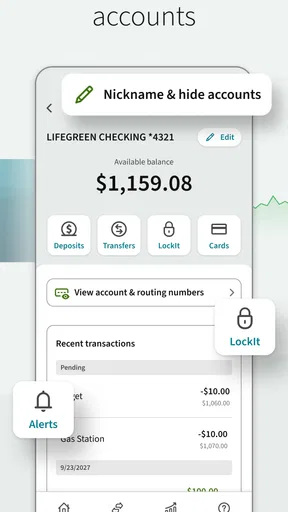
A realistic example is standing in a shop and wondering whether a recent debit has already reduced the available balance. I would open the app, check the relevant account information, and use that view to decide whether to continue with the purchase. That is a much better use case for this app than expecting it to explain every aspect of my spending habits. The value is immediate visibility, not a lesson in personal finance.
Worth Reading Before You Choose

EA SPORTS FC Mobile 26 Is a Bigger Football Game, but It Takes Time

Flipboard Shows What News Apps Must Do Beyond the Feed

Switching to Android Auto Means Rethinking Your Driving Routine

Google Calendar Makes a Crowded Week Easier to Manage

Ludo King Makes the Most of the Minutes Between Plans

Baby Panda World Brings Quick Play to Modern Phones, but Its Game Library Feels Busy
There is an important distinction between an app responding quickly and banking information being current. The app can feel responsive while the underlying account state is still changing. I would avoid repeatedly refreshing in a hurry and assuming the newest screen automatically represents every pending event. For high-stakes decisions, I would read the transaction details carefully and allow normal account-processing time rather than treating a phone screen as an instant guarantee.
Another practical tip is to keep the app for decisions that benefit from direct access, while using a separate note or budgeting system for planning. That division reduces the temptation to force Regions Mobile into a role it does not need to fill. The app works best as the place where I verify banking activity; a dedicated budget tool may be better for comparing planned and actual spending over a month.
What happens during heavier use
Most people will not use a banking app continuously, but some moments create a heavier workload: reviewing several transactions after a busy weekend, checking more than one account, or trying to understand why a balance looks different from expected. In those situations, clarity matters more than decorative design. I prefer a controlled sequence—check the account, inspect the activity, then make a decision—rather than jumping among unrelated screens.
That workflow also helps prevent a common mistake: confusing a transaction that is visible with one that has fully settled. When I review a group of purchases, I would look at the individual entries instead of relying only on the headline balance. This is one of the app’s more useful roles in daily life, because a quick account glance can identify something worth investigating before it becomes a forgotten detail.
Heavy use can also mean returning to the app several times in one day. I would expect that to be comfortable for ordinary checks because the product is narrowly focused on banking, but I would not judge it by the standards of a high-performance app. Financial screens may take longer when information has to be retrieved or confirmed. A short wait is less concerning than an unclear result, especially when the action involves money.
The trade-off is that a focused bank app may feel less flexible than a broad financial hub. An independent finance app can sometimes bring accounts together and offer a wider overview, while Regions Mobile gives a more direct relationship with Regions Bank. I would choose the latter when account access and straightforward checking are my priorities. I would choose the broader alternative when my main goal is to compare several institutions or study spending across them.
Reliability and recovering from an interrupted session
Reliability in mobile banking is partly about stability and partly about confidence. I want to know whether the app has returned to a safe, understandable state after I switch away, lose connectivity, or become distracted. I would not treat a screen that stopped changing as proof that a banking action completed. Instead, I would reopen the relevant area and verify the resulting account activity before moving on.
This is especially important when a session is interrupted. A phone call, a weak connection, or an accidental swipe can break the rhythm of a banking task. My preferred recovery habit is simple: return to the app, check whether the original screen still reflects the intended action, and look for a clear confirmation or resulting transaction before attempting anything again. That avoids duplicating an action merely because the first attempt did not immediately look complete.
I also like to separate viewing from acting when I am distracted. If I only need to inspect an account, I do that first and leave more consequential work for a moment when I can concentrate. This is not a criticism of Regions Mobile specifically; it is sensible behavior for any financial app. The phone is convenient, but convenience can encourage rushed decisions.
The app’s scale is reassuring in a general sense. Millions of installations and a substantial body of user feedback indicate that it is not an obscure utility with no established audience. Still, reliability can vary with the phone, operating system, connection, and the bank’s service availability. I would keep an alternative way to contact or access my bank for urgent situations, rather than making any single mobile app my only route to financial help.
Device limits, compatibility, and resource expectations
Regions Mobile requires iOS 11 or later. That is an important practical detail for anyone using an older iPhone or maintaining an older operating system for compatibility reasons. Before relying on the app, I would check the phone’s software version and make sure the device can receive the application’s current updates. A finance app that cannot be installed or maintained on a particular phone is not useful, regardless of how polished it feels on newer hardware.
On a compatible device, I would expect a banking app with this focused purpose to be less demanding than an entertainment app that continuously renders media or complex scenes. I would not, however, promise a specific battery impact, memory footprint, or loading time because those experiences depend on the device and the surrounding connection. My practical advice is to judge it by the tasks you actually perform: does it open comfortably, remain understandable, and let you recover when you leave and return?
Storage is another reason to keep expectations realistic. A bank app does not need to replace every finance tool on the phone. If you install it only for account access and use another app for budgets, receipts, or investment tracking, the arrangement can be more efficient than expecting one application to do everything. That modular approach also makes it easier to change one part of your financial setup without disrupting basic banking access.
The Everyone content rating makes the app broadly suitable from an age-classification perspective, but that should not be confused with financial independence. A younger user may be able to use an app with that rating, yet account ownership, permissions, and responsible money decisions remain separate questions. I would recommend it based on the user’s relationship with Regions Bank and their ability to understand the transactions they are viewing, not simply on the age label.
Who will get the most from it
I think Regions Mobile is a strong match for a Regions customer who wants routine banking access without carrying a laptop into every decision. It makes sense for checking account activity during a commute, reviewing purchases after errands, or confirming details before paying a bill. The app’s free price also removes a direct purchase barrier, which makes trying it a reasonable step for an existing customer.
It is particularly useful for people who prefer checking facts themselves rather than waiting for a monthly statement. A quick review can help catch an unfamiliar transaction while the surrounding memory is still fresh. I would use it as part of a weekly money routine: inspect recent activity, note anything I do not recognize, and then handle questions while they are still easy to trace.
I would be more cautious about recommending it to someone who wants sophisticated financial analysis. If your priority is a unified view of accounts at different banks, detailed category rules, investment performance, or an elaborate long-term budget, a specialized finance app may be the better primary tool. Regions Mobile can remain useful for direct account verification, but it should not be expected to replace every service in that category.
It is also not the right choice for someone who is uncomfortable with mobile banking altogether. A phone can make access easier, but it can also make money decisions feel rushed. If you prefer speaking with a person for most tasks or want the fuller context of a desktop banking session, the app may serve as a backup rather than your main channel. I would rather see someone use it selectively and confidently than install it and treat every screen as self-explanatory.
My performance verdict after using it
My overall impression is that Regions Mobile succeeds by staying close to a clear purpose: giving Regions Bank customers a convenient way to check and manage everyday banking from a phone. Its perceived speed is good for short, focused checks, while heavier review sessions are best handled patiently and one transaction at a time. I value that balance because financial software should favor understandable results over flashy movement.
The main limitations are equally clear. The app is tied to Regions Bank, so it is not a sensible general banking dashboard for people whose accounts are elsewhere. It also does not replace a dedicated budgeting or multi-bank analysis tool for users who want a broad financial picture. Those are not failures so much as boundaries, and knowing them prevents disappointment.
With support for iOS 11 and later, a free price, and a 4.4 average from around 128 thousand ratings, it looks like a mature option for its intended audience. The developer, Regions Bank, has kept the product positioned as a direct mobile companion to its banking service. I would install it if I already banked with Regions and wanted a dependable everyday checkpoint for account activity.
My recommendation is simple: use Regions Mobile for direct, routine banking visibility, and pair it with another tool only when your needs extend into detailed budgeting or multiple institutions. Before relying on it for an urgent decision, I would verify the exact transaction or balance information on screen and give interrupted actions a deliberate second check. Used that way, it feels less like an all-purpose money manager and more like what I actually want from a bank app: a practical, focused way to stay connected to my Regions account.
Pros
- Mobile check deposit is convenient for everyday banking.
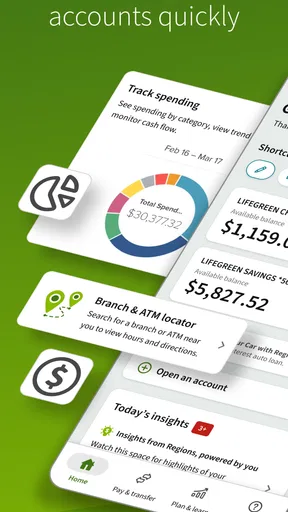
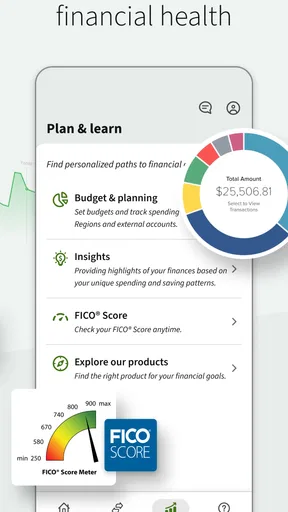
- Useful budgeting tools help track spending and account activity.
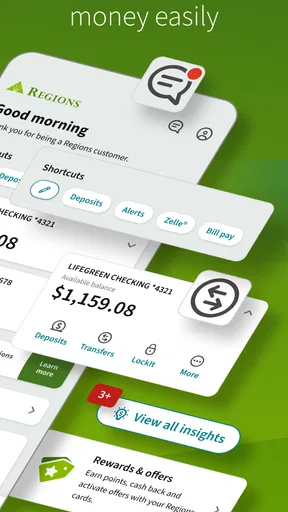
- Bill pay and transfers are easy to manage from the app.
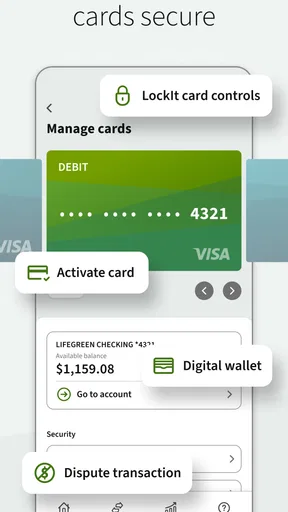
- Card controls can help lock cards and monitor transactions quickly.
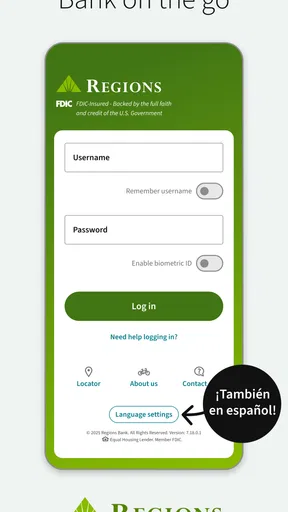
- Biometric login provides fast access without repeatedly entering a password.
Cons
- Some features may be limited outside Regions service areas.
- Mobile deposit limits can vary by account and customer history.
- Transfer availability and processing times may not be immediate.
- Certain services may require additional fees or account eligibility.
- The app may feel less useful for customers with complex banking needs.
FAQs for Regions Bank
What is Regions Bank, and what can I do with its mobile app?
Regions Bank is a U.S. financial institution offering checking and savings accounts, credit cards, loans, mortgages, and other banking services. Its mobile app generally lets customers check balances, review transactions, transfer money, pay bills, deposit eligible checks, locate branches and ATMs, manage cards, and receive account alerts. Available features can vary depending on your account type, location, and enrollment status.
Is the Regions Bank app safe to use for mobile banking?
The Regions Bank app uses security measures such as encrypted connections, login protection, device authentication options, alerts, and fraud-monitoring tools to help protect customer information. However, no banking app can eliminate every risk. Download it only from the official Google Play Store or Apple App Store, keep your device updated, avoid public Wi-Fi for sensitive transactions, and never share passwords or verification codes.
Can I deposit checks using the Regions Bank mobile app?
Eligible Regions Bank customers may be able to deposit checks through the app by photographing the front and back of a properly endorsed check and submitting it for review. Before using mobile deposit, check the app for current limits, availability rules, endorsement instructions, and hold periods. Keep the original check safely until the deposit is fully processed and the funds are available.
Are there fees for using the Regions Bank mobile app?
Downloading and using the Regions Bank app is typically free, but normal account fees, transaction charges, overdraft costs, wire fees, or service charges may still apply based on your account agreement. Your mobile carrier may also charge data or messaging fees. Some features, such as expedited transfers or certain payment services, can have separate conditions, so review the applicable fee schedule.
Who can use the Regions Bank app, and what do I need to get started?
The app is intended primarily for existing Regions Bank customers with eligible online banking access. To get started, you generally need a supported Android or iOS device, an internet connection, your Regions online banking credentials, and access to a registered phone number or email for verification. Customers should confirm regional availability, operating-system requirements, and enrollment details before downloading.


